At GreatDay HR, we believe in making every HR and benefits process seamless for employees and employers alike. This guide covers everything you need to know about how to get a PhilHealth ID in the Philippines, whether you’re a first-time applicant, an existing member needing replacement, or managing employee registrations.
What Is a PhilHealth ID and Why It Matters
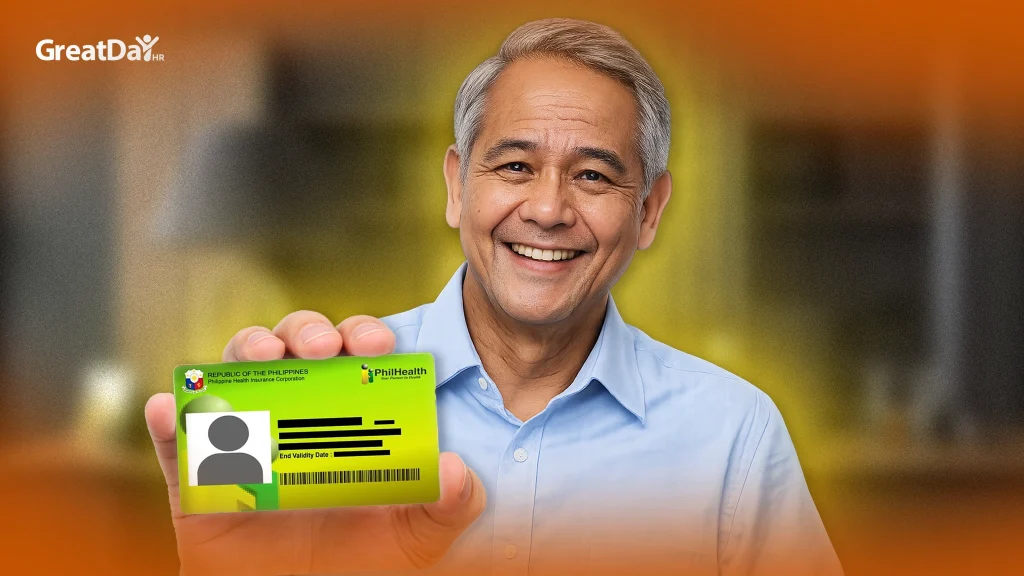
A PhilHealth ID (also called a PhilHealth Identification Card or PIN) serves as proof of membership to the National Health Insurance Program (NHIP). It enables:
- Access to healthcare services and benefits at PhilHealth-accredited facilities
- Faster claims processing when hospitalized or accessing outpatient care
- A legitimate identification in HR and government transactions (especially when issued in digital or PVC form)
The ID links you to your PhilHealth number (PIN), a unique identifier that stays with you even if you change employers.
Note: The ID issuance does not by itself grant benefits — your contributions and membership status determine eligibility.
Types of PhilHealth IDs & Validity
| ID Type | Description | Cost / Fee | Use / Acceptance |
| Regular (paper ID / laminated card) | Standard ID upon registration | Free | Valid for hospital transactions, claims, proof of membership |
| Digitized / PVC PhilHealth Insurance ID | Plastic, durable, enhanced ID | ~ ₱90 (may vary by branch) | Accepted in more institutions, usable as official ID |
| Digital / e-ID | Accessible through the MyPhilHealth Portal | Free | Useful for online submission and proof when physical card is delayed |
The regular ID is free of charge for members. The PVC or plastic version typically incurs a nominal fee (e.g. ₱90) depending on the local PhilHealth branch.
A digital submission (PIN registration) is processed within 3 to 5 working days after uploading complete documents.
Who Needs to Apply for a PhilHealth ID?
You should apply if you fall into any of these categories:
- First-time registrants (never had a PhilHealth number or ID)
- Self-employed, voluntary, or informal sector workers
- Employed individuals whose employer hasn’t processed their registration
- Members who lost their ID or whose card was damaged
- Members who need to update their data (name change, civil status, dependents)
Requirements Before You Apply
To ensure your application is accepted without delays, prepare the following:
- PhilHealth Member Registration Form (PMRF) — properly filled out
- Two (2) valid government-issued IDs (e.g., passport, driver’s license, SSS, UMID, postal ID)
- PSA birth certificate (to validate personal details), or other supporting documents
- Two (2) recent 1×1 ID photos
- If applying via representative, an authorization letter and IDs of both parties
Double-check spelling, dates, and signature consistency. Mistakes are a common cause of rejection.
Step-by-Step: How to Get a PhilHealth ID
Option 1: Walk-in / In-person Application
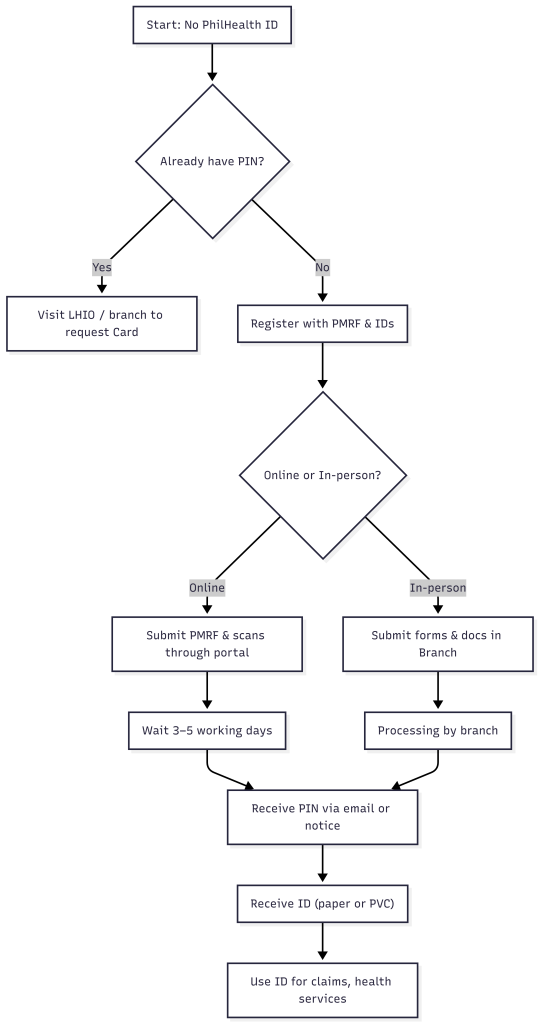
- Visit your Local Health Insurance Office (LHIO) or any PhilHealth branch in your area.
- Request and fill out the PMRF (Member Registration Form).
- Submit supporting documents (IDs, birth certificate) and photos.
- Indicate that you wish to get a PhilHealth ID / Identification Card.
- Wait for processing (varies by office). The regular ID is often released in the same visit or after a short wait.
- For PVC or enhanced ID, a separate schedule or notification might follow.
Option 2: Online / Electronic Registration (For Individuals)
- Go to the PhilHealth NHIP Online Registration portal for individuals.
- Complete the registration and upload scanned supporting documents.
- PhilHealth processes the application in 3–5 working days and sends the PIN to your email.
- After PIN issuance, you may visit a branch to request the physical ID (if not automatically issued).
Important: Online registration cannot replace submitting the hard-copy PMRF and documents — those are still required.
Replacing a Lost or Damaged PhilHealth ID
If your card is lost or damaged:
- Go to a PhilHealth branch or LHIO.
- Fill out a new PMRF (check “Replacement / Reissuance”) and submit your IDs.
- If someone else is applying on your behalf, present an authorization letter.
- Pay any applicable fees for the PVC or upgraded ID.
- Wait for processing and pick up your new card when notified.
Some branches may require an affidavit of loss, but many now allow a straight replacement application.
Checking and Verifying Your PhilHealth Number (PIN)
- Ask your employer / HR department — if they processed your registration, they should have your PIN.
- Visit a PhilHealth office or hotline and provide your personal details to trace your PIN.
- Log in to the MyPhilHealth Portal (if registered) to view your membership status, contributions, and PIN.
Common Issues & How to Avoid Them
| Problem | Cause | Solution |
| Rejected application | Incomplete or mismatched documents | Double-check names, birthdates, signatures; submit full set of IDs |
| Delay in ID issuance | Branch backlog or missing documents | Go early, confirm with branch, follow up after 2–3 days |
| Duplicate PIN | You already had registration under previous employer | Submit proof of old record or ask PhilHealth to merge duplicate accounts |
| Unaccepted ID | Some institutions don’t accept paper ID | Request PVC/digitized ID if required by banks or government offices |
Suggested Process Flow (Mermaid Diagram)
Tips for Faster & Smoother Application
- Go to less busy satellite or mall-based PhilHealth branches.
- Bring extra copies of your documents.
- Go early in the morning to avoid queues.
- Ask staff to check your documents on the spot before submission.
- Keep digital scans and backups of all submitted documents.
- Follow up after 2–3 business days if no update.
Why GreatDay HR Recommends Streamlined Benefits Management
At GreatDay HR, we know the headaches HR teams face managing health insurance registrations, data consistency, and benefits compliance across multiple employees. That’s why our platform is built to:
- Automate employee benefits enrollment
- Validate required documents and flag missing information
- Track status of ID applications and reminders
- Provide consolidated dashboards for HR leaders
If you’d like to simplify HR operations and ensure all your staff get their PhilHealth IDs on time, check our services at greatdayhr.ph and explore our Managed Payroll Service.
We are committed to helping your business stay compliant while giving your employees a seamless experience.