Employers in the Philippines are now required to use the PhilHealth Electronic Premium Remittance System (EPRS) for reporting and paying employee contributions. This online system simplifies premium remittance, reduces manual errors, and ensures compliance with PhilHealth regulations.
This article provides a complete guide to the EPRS, from registration to online payment and reconciliation—perfect for HR and payroll teams looking to streamline their operations.
1. What Is the PhilHealth EPRS?
The Electronic Premium Remittance System (EPRS) is PhilHealth’s web-based platform that allows employers to electronically manage their employee contribution records and remittances.
Through the EPRS, employers can:
- Generate Statements of Premium Accounts (SPA)
- Submit monthly remittance reports
- Process online payments through accredited channels
- Monitor payment status in real time
EPRS aims to eliminate paper-based submissions and provide faster, more accurate posting of premium payments.
2. How to Register in the EPRS
Step 1: Prepare Employer Requirements
Before registration, prepare the following:
- PhilHealth Employer Number (PEN)
- Business Permit and SEC/DTI Registration
- Authorized representative details (Employer’s PEER account)
Step 2: Register through PhilHealth
- Visit the PhilHealth EPRS page via philhealth.gov.ph.
- Complete the employer online registration form and submit required documents.
- Wait for PhilHealth’s confirmation email with your login credentials.
Step 3: Log In to the EPRS Portal
Go to https://eprs01.philhealth.gov.ph, then log in using your PEN and password. You may update your password and contact information under the user profile settings.
3. Navigating the EPRS Dashboard
Upon login, the dashboard provides access to various functions that employers need:
Employer Profile
Displays your business details (PEN, TIN, address).
To update business information, employers must coordinate directly with PhilHealth.
Employee Management
This section lets you add, update, or remove employees, including their PhilHealth numbers, salary brackets, and status (active, resigned, etc.).
Remittance Management
Here, you can generate your Statement of Premium Account (SPA), which serves as your payment reference for monthly premium contributions.
💡 Note: No payment will be accepted without a valid SPA. Always generate it before proceeding to payment.
4. How to Pay PhilHealth Contributions Online
EPRS provides multiple online payment options, offering convenience for businesses of all sizes.
Option 1: Through Accredited Banks
Log in to your bank’s online platform (e.g., Landbank, DBP) that supports PhilHealth EPRS payments. Use the SPA reference number when processing payment.
Option 2: Through Digital Payment Gateways
Employers can also pay contributions via:
- GCash
- Maya
- MyEG PH
- Credit or Debit Card
After payment, you’ll receive an email confirmation and see the transaction automatically reflected in your EPRS dashboard.
5. Payment Deadlines for Employers
PhilHealth remittance deadlines depend on the last digit of your PhilHealth Employer Number (PEN):
| PEN Ending | Payment Deadline (Following Month) |
| 0–4 | 11th to 15th day |
| 5–9 | 16th to 20th day |
Submitting and paying after the deadline may result in interest or penalties, so ensure timely processing.
6. Monitoring & Reconciliation
EPRS provides transparency by allowing employers to monitor and verify payment records.
How to Check Payment Status:
- Go to the Transaction Monitoring tab.
- View the list of posted and pending payments.
- Download or print transaction reports for documentation.
If a payment doesn’t appear as posted, verify the SPA reference used or contact PhilHealth for assistance.
7. Troubleshooting Common EPRS Issues
| Issue | Possible Cause | Solution |
| SPA not generated | Missing employee data | Update employee list and re-generate SPA |
| Payment not posted | Incorrect SPA reference | Double-check and revalidate with your bank |
| Account locked | Multiple failed login attempts | Reset password through PhilHealth support |
| Unmatched contribution data | Payroll system mismatch | Cross-check EPRS data with payroll records |
To prevent these errors, always keep your employee database updated and reconcile payroll with EPRS data monthly.
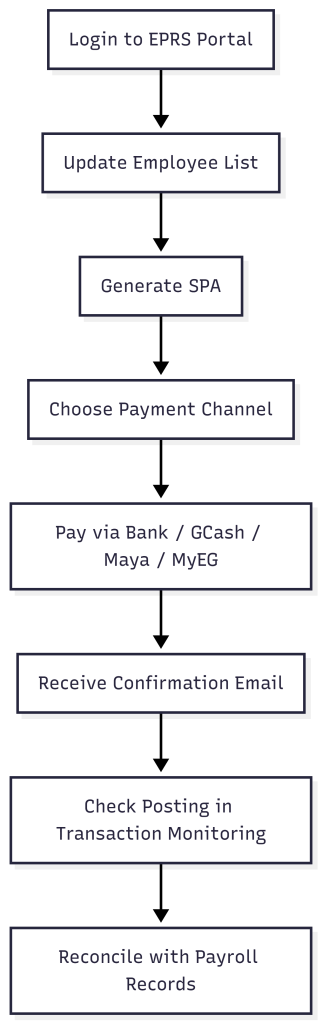
8. Workflow Diagram: EPRS Remittance Process
9. Best Practices for Employers
- Always generate your SPA before the deadline.
- Review employee data for any changes in salary or employment status.
- Use digital payments for faster confirmation and posting.
- Keep a copy of your payment confirmation email for auditing purposes.
- Reconcile your payroll records with EPRS every month.
By following these steps, employers can ensure compliance and maintain accurate contribution records.
10. Simplify HR and Payroll Compliance
Manually handling government contributions like PhilHealth, SSS, and Pag-IBIG can be tedious and error-prone. Automate your HR processes with GreatDay HR — a complete HR and payroll system designed for Filipino businesses.
With Managed Payroll Service , companies can enjoy accurate, DOLE-compliant payroll and contribution computations — including automated PhilHealth EPRS integrations — ensuring timely and hassle-free payments every month.